|
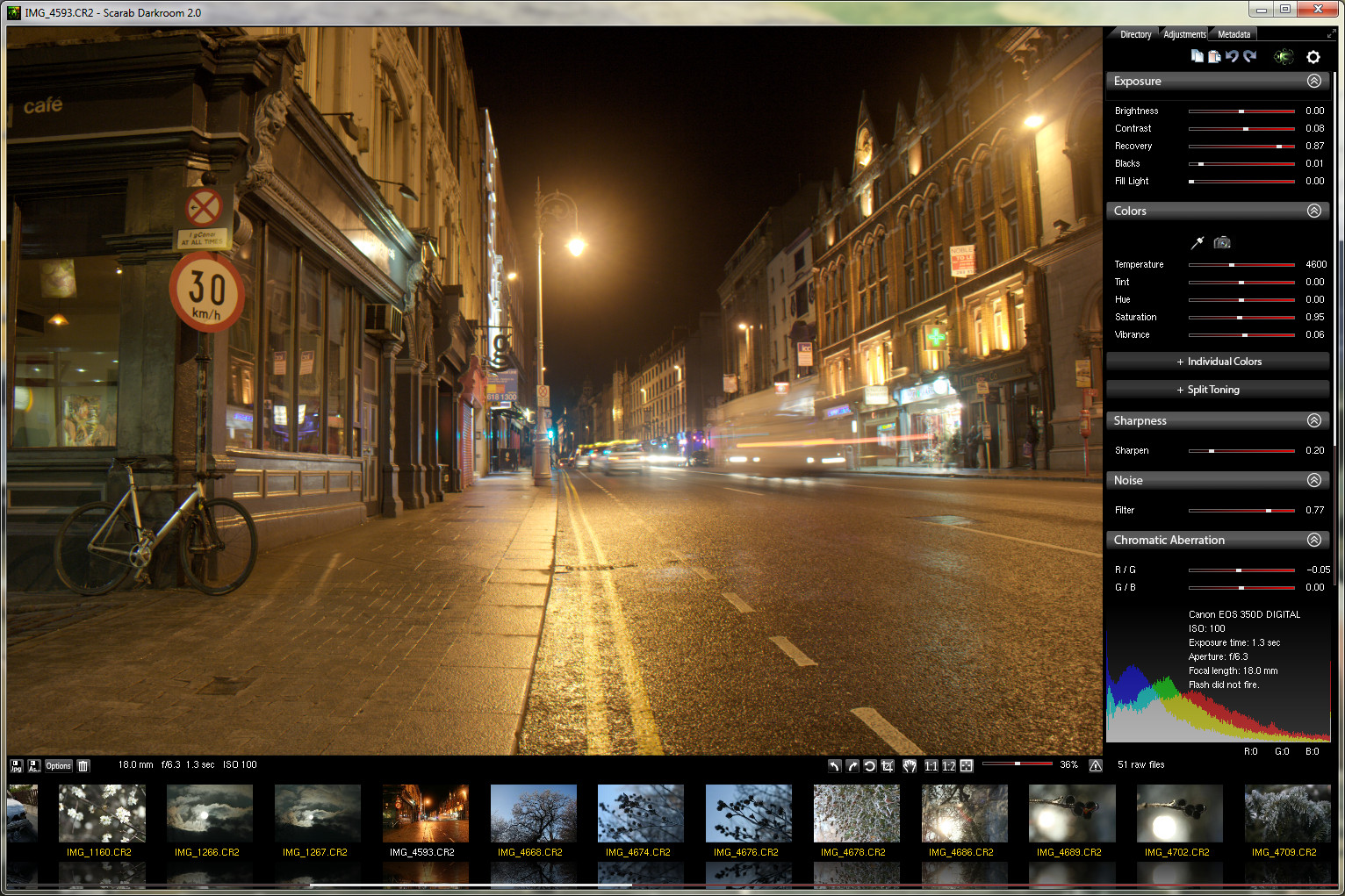
Scarab Darkroom is a fast and easy to use digital camera raw file converter for Windows. It supports most raw format capable cameras from Canon, Nikon, Olympus, Panasonic, Pentax, Samsung, and Sony.
Download 30 days trial version
(current version: 2.28, released 25th of May 2020)
Buy now for €29
Requirements:
4 gigabytes of RAM or more, OpenGL 2.0 capable graphics chip, 64 bit Windows 7 / 8 / 10
Supported cameras:
Canon EOS 1D, 1D Mark IV, 1Ds, 1Ds Mark II, 1D X, 1D X Mark II, 5D, 5D Mark II, 5D Mark III, 6D, 6D Mark II, 7D, 7D Mark II, 10D, 30D, 40D, 50D, 60D, 70D, 88D, 80D, 100D/Rebel SL1, 300D/Digital Rebel, 350D/XT, 400D/XTi, 450D/XSi, 500D/T1i, 550D/T2i, 600D/T3i, 650D/T4i, 700D, 750D, 760D, 800D, 1000D/XS, 1100D/T3, 1200D, 1300D, M, M3, M5, M10, M100, Powershot Pro 1, S45, S50, S70, S90, S95, S100, SX1 IS, G2, G3, G6, G9, G9 X, G9 X II, G10, G11, G12, G15, G1X
Fujifilm F550EXR, F600EXR, HS10/HS11, X10, X100
Nikon 1 AW1, 1 J1, 1 J4, 1 V1, 1 V2, 1 V3, Coolpix A, D1, D1H, D2H, D2X, D2Xs, D3, D3s, D3X, D4, D5, D40, D40X, D50, D60, D70, D70s, D80, D90, D100, D200, D300, D300s, D500, D600, D610, D700, D750, D3000, D3100, D3200, D3300, D3400, D5000, D5100, D5200, D5300, D5500, D5600, D7000, D7200, D7500, Df, E8400, P330, P6000, P7000, P7100, P7700, P7800
Olympus E-1, E-3, E-5, E-5 Mark II, E-30, E-300, E-400, E-410, E-420, E-450, E-500, E-510, E-520, E-600, E-620, E-M1, EM1 II, E-M5, E-M10, E-M10 Mark II, E-P1, E-P2, E-P3, E-P5, E-PL1, E-PL1s, E-PL2, E-PL3, E-PL5, E-PL6, E-PL7, E-PL8, E-PL9, E-PM1, E-PM2, SH-2, SP-350, SP-510 UZ, SP-550 UZ, SP-560 UZ, SP-570 UZ, C5050Z, C8080WZ, TG-4, XZ-1
Panasonic G1, G2, G3, G5, G8, G10, G80, G81, G85, GF1, GF2, GF3, GF5, GF6, GH1, GH2, GH3, GH4, GH5, GM1, GX1, GX7, GX8, GX9, L10, LF1, LX3, LX5, FZ18, FZ28, FZ38, FZ35, FZ150, FZ200, LX7
Pentax K-01, K-3, K-3 II, K-5, K-5 II, K-5 II s, K-7, K10D, K20D, K-30, K50, K100D, K100D Super, K110D, K200D, K500, K-m/K2000D, K-r, K-S1, K-S2, K-x, *ist D, *ist DL, *ist DL2, *ist DS, *ist DS2, MX-1, Q, Q7, Q10, QS1
Samsung EX1, GX-1, GX-1S, GX-1L, GX-20, NX10, NX11, NX20, NX30, NX200, NX210, NX300, NX1000, NX1100, Pro 815
Sony α7, α7 III, α9, α100, α200, α230, α290, α300, α330, α350, α380, α390, α450, α500, α550, α560, α580, α700, α850, α900, α3000, α3500, α5000, α51000, α6000, α6300, NEX-3, NEX-3N, NEX-5, NEX-5N, NEX-5T, NEX-6, NEX-7, NEX-C3, NEX-F3, SLT-α33, SLT-α35, SLT-α37, SLT-α55, SLT-α57, SLT-α58, SLT-α65, SLT-α77, SLT-α99, DSC-R, DSC-V3, QX1, RX0, RX1, RX1R, RX10, RX10 II, RX10 IV, RX100, RX100 II, RX100 III, RX100 IV, RX100 VI
Version history:
|